|
|
<h1 align="center" style="border-bottom: none">
|
|
|
<div>
|
|
|
<a href="https://www.docuseal.com">
|
|
|
<img alt="DocuSeal" src="https://github.com/user-attachments/assets/38b45682-ffa4-4919-abde-d2d422325c44" width="80" />
|
|
|
<br>
|
|
|
</a>
|
|
|
DocuSeal
|
|
|
</div>
|
|
|
</h1>
|
|
|
<h3 align="center">
|
|
|
开源文档填写与签署
|
|
|
</h3>
|
|
|
<p align="center">
|
|
|
<a href="https://hub.docker.com/r/docuseal/docuseal">
|
|
|
<img alt="Docker releases" src="https://img.shields.io/docker/v/docuseal/docuseal">
|
|
|
</a>
|
|
|
<a href="https://discord.gg/qygYCDGck9">
|
|
|
<img src="https://img.shields.io/discord/1125112641170448454?logo=discord"/>
|
|
|
</a>
|
|
|
<a href="https://twitter.com/intent/follow?screen_name=docusealco">
|
|
|
<img src="https://img.shields.io/twitter/follow/docusealco?style=social" alt="Follow @docusealco" />
|
|
|
</a>
|
|
|
</p>
|
|
|
<p>
|
|
|
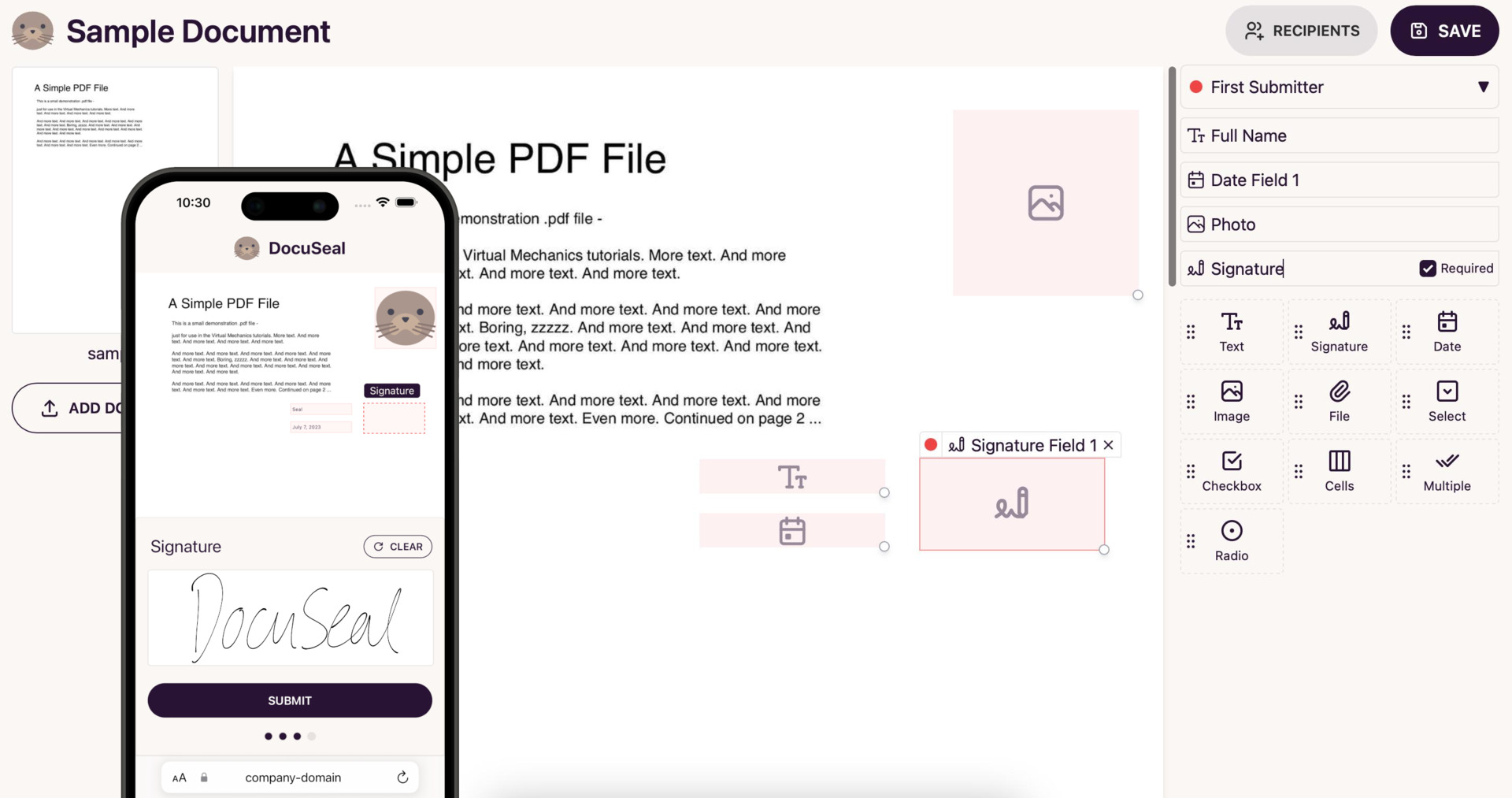
DocuSeal 是一个开源平台,提供安全、高效的数字文档签署和处理服务。创建 PDF 表单,让用户在任何设备上通过易于使用、针对移动端优化的 Web 工具在线填写和签署。
|
|
|
</p>
|
|
|
<h2 align="center">
|
|
|
<a href="https://demo.docuseal.tech">✨ 在线演示</a>
|
|
|
<span>|</span>
|
|
|
<a href="https://docuseal.com/sign_up">☁️ 云端试用</a>
|
|
|
</h2>
|
|
|
|
|
|
[](https://demo.docuseal.tech)
|
|
|
|
|
|
## 功能
|
|
|
|
|
|
- PDF 表单字段构建器(WYSIWYG)
|
|
|
- 支持 12 种字段类型(签名、日期、文件、复选框等)
|
|
|
- 每个文档支持多个提交者
|
|
|
- 通过 SMTP 自动发送邮件
|
|
|
- 文件存储支持本地磁盘、AWS S3、Google Storage、Azure Cloud
|
|
|
- 自动 PDF 电子签名
|
|
|
- PDF 签名验证
|
|
|
- 用户管理
|
|
|
- 移动端优化
|
|
|
- 7 种 UI 语言,签署支持 14 种语言
|
|
|
- API 和 Webhooks 集成
|
|
|
- 几分钟即可轻松部署
|
|
|
|
|
|
## 专业功能
|
|
|
|
|
|
- 公司标志和白标
|
|
|
- 用户角色
|
|
|
- 自动提醒
|
|
|
- 通过 SMS 进行邀请和身份验证
|
|
|
- 条件字段和公式
|
|
|
- 通过 CSV、XLSX 电子表格导入批量发送
|
|
|
- SSO / SAML
|
|
|
- 通过 HTML API 创建模板([指南](https://www.docuseal.com/guides/create-pdf-document-fillable-form-with-html-api))
|
|
|
- 通过 PDF 或 DOCX 及字段标签 API 创建模板([指南](https://www.docuseal.com/guides/use-embedded-text-field-tags-in-the-pdf-to-create-a-fillable-form))
|
|
|
- 嵌入式签署表单([React](https://github.com/docusealco/docuseal-react)、[Vue](https://github.com/docusealco/docuseal-vue)、[Angular](https://github.com/docusealco/docuseal-angular) 或 [JavaScript](https://www.docuseal.com/docs/embedded))
|
|
|
- 嵌入式文档表单构建器([React](https://github.com/docusealco/docuseal-react)、[Vue](https://github.com/docusealco/docuseal-vue)、[Angular](https://github.com/docusealco/docuseal-angular) 或 [JavaScript](https://www.docuseal.com/docs/embedded))
|
|
|
- [了解更多](https://www.docuseal.com/pricing)
|
|
|
|
|
|
## 部署
|
|
|
|
|
|
|Heroku|Railway|
|
|
|
|:--:|:---:|
|
|
|
| [<img alt="Deploy on Heroku" src="https://www.herokucdn.com/deploy/button.svg" height="40">](https://heroku.com/deploy?template=https://github.com/docusealco/docuseal-heroku) | [<img alt="Deploy on Railway" src="https://railway.app/button.svg" height="40">](https://railway.com/deploy/IGoDnc?referralCode=ruU7JR)|
|
|
|
|**DigitalOcean**|**Render**|
|
|
|
| [<img alt="Deploy on DigitalOcean" src="https://www.deploytodo.com/do-btn-blue.svg" height="40">](https://cloud.digitalocean.com/apps/new?repo=https://github.com/docusealco/docuseal-digitalocean/tree/master&refcode=421d50f53990) | [<img alt="Deploy to Render" src="https://render.com/images/deploy-to-render-button.svg" height="40">](https://render.com/deploy?repo=https://github.com/docusealco/docuseal-render)
|
|
|
|
|
|
#### Docker
|
|
|
|
|
|
```sh
|
|
|
docker run --name docuseal -p 3000:3000 -v.:/data docuseal/docuseal
|
|
|
```
|
|
|
|
|
|
默认情况下,DocuSeal Docker 容器使用 SQLite 数据库来存储数据和配置。也可以通过指定 `DATABASE_URL` 环境变量来使用 PostgreSQL 或 MySQL 数据库。
|
|
|
|
|
|
#### Docker Compose
|
|
|
|
|
|
将 docker-compose.yml 下载到您的私有服务器:
|
|
|
```sh
|
|
|
curl https://raw.githubusercontent.com/docusealco/docuseal/master/docker-compose.yml > docker-compose.yml
|
|
|
```
|
|
|
|
|
|
使用 docker compose 在自定义域名上通过 https 运行应用程序(请确保您的 DNS 指向服务器,以自动通过 Caddy 颁发 SSL 证书):
|
|
|
```sh
|
|
|
sudo HOST=your-domain-name.com docker compose up
|
|
|
```
|
|
|
|
|
|
## 企业服务
|
|
|
|
|
|
### 将无缝文档签署集成到您的 Web 或移动应用中
|
|
|
|
|
|
在 DocuSeal,我们拥有专业技术和经验,可以将文档创建、填写、签署和处理与您的产品无缝集成。我们专注于与各行业合作,包括**银行、医疗保健、运输、房地产、电子商务、KYC、CRM 以及其他需要批量文档签署的软件产品**。通过使用 DocuSeal,我们可以帮助降低电子文档开发和处理的总体成本,同时确保安全性和符合当地电子文档法律。
|
|
|
|
|
|
[预约会议](https://www.docuseal.com/contact)
|
|
|
|
|
|
## 许可证
|
|
|
|
|
|
根据 AGPLv3 许可证及第 7(b) 条附加条款进行分发。有关更多信息,请参阅 [LICENSE](https://github.com/docusealco/docuseal/blob/master/LICENSE) 和 [LICENSE_ADDITIONAL_TERMS](https://github.com/docusealco/docuseal/blob/master/LICENSE_ADDITIONAL_TERMS)。
|
|
|
除非另有说明,所有文件 © 2023-2026 DocuSeal LLC。
|
|
|
|
|
|
## 工具
|
|
|
|
|
|
- [签名制作器](https://www.docuseal.com/online-signature)
|
|
|
- [在线签署文档](https://www.docuseal.com/sign-documents-online)
|
|
|
- [在线填写 PDF](https://www.docuseal.com/fill-pdf) |
